Sauvegarde et Restauration de
***************************INFOLIFE, Make Life Easier!***************************
Handy and Simple!One click to backup or restore your SMS!
Tips:1.
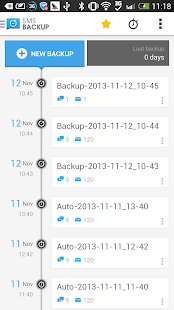
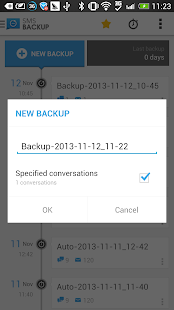
How to backup my SMS?Click the 'Backup'button of dashboard,input the backup file's name,press 'OK' then backup will be started.2.
How can I restore my SMS?
Click the 'Restore' button of dashboard,choose and click the backup file which you want restore from.3.
What is 'Clear SMS'?This function will delete all your SMS,please do it after backup.4.
How can I report a bug or crash?Or add a new feature?Click the 'Tool' button on the upper right
corner,choose the 'feedback' to send a email to us.5.
I like this free backup app,do you need donate or otherthing?Thanks,If you like this app,please rate us a five star on market :)
Any problem about SMS Backup & Restore, it's better to send feedback to us to get help then 1 star!We'll reply
ASAP!
DROID X/2 users: due to a firmware bug (timezones) incoming messages might not be backed up.
Complain to
Motorola, don't blame this app!
This App needs the following permissions to work:* Storage - modify/delete SD card contents (android.permission.WRITE_EXTERNAL_STORAGE): To create the backup
file on the SD card.* Your messages - read and write SMS (android.permission.READ_SMS, android.permission.WRITE_SMS): Needed to read SMS during backups and write them
during restore.* Your personal information - read contact data (android.permission.READ_CONTACTS): To display and store the
contact names in the backup file.* Network communication - full Internet access (android.permission.INTERNET): For bug report
About Sauvegarde et Restauration de
- Package name (App ID)
- mobi.infolife.smsbackup
- Available on
- Google Play
- Price
- Free
- Developer
- MobiSystems
Looking for the Sauvegarde et Restauration de APK?
The safest way to get Sauvegarde et Restauration de (mobi.infolife.smsbackup) on your Android device is to install it directly from Google Play — you'll always get the latest official version, automatic updates, and no risk of modified or infected APK files from third-party sites.
Social Features
Connect and share with friends and the community.
Gaming Features
Enjoy immersive gaming experience with various game modes.
Food & Dining
Discover recipes and order food from your favorite restaurants.
Decouvrez Sauvegarde et Restauration de en action

Frequently Asked Questions
Is Sauvegarde et Restauration de free?
Yes, Sauvegarde et Restauration de is free to download and install on Android through Google Play.
How do I install Sauvegarde et Restauration de on Android?
Open Google Play on your Android phone or tablet, search for Sauvegarde et Restauration de by MobiSystems or tap the Google Play button on this page, then tap Install. The app downloads and installs automatically.
What is mobi.infolife.smsbackup?
mobi.infolife.smsbackup is the App ID (package name) of Sauvegarde et Restauration de on Google Play. Every Android app has a unique package name, and it is the safest way to verify you are installing the official app.
Is Sauvegarde et Restauration de safe to download?
Installing Sauvegarde et Restauration de from Google Play is the safest option: you get the official version published by MobiSystems, verified by Google Play Protect, with automatic updates. Avoid APK files from unofficial third-party sites.

Get Sauvegarde et Restauration de Today
Sauvegarde et Restauration de for Android — free download on Google Play.
Compatible with Android phones and tablets — available on Google Play.
Vous aimez cette appli ?
Partagez-la avec vos amis et votre famille sur votre reseau social prefere.
Posez vos questions a l'IA
Obtenez des reponses instantanees sur les fonctionnalites et astuces.